AI SEO, GEO & AEO | Updated April 2026 | 11 min read
How to Optimize Website for Perplexity and AI Search
To optimize your website for Perplexity and AI search, you need to solve a different problem than traditional SEO. Perplexity does not rank pages — it extracts facts and cites sources. If your content is not structured for extraction, it will not be cited regardless of how well it ranks on Google.
Perplexity AI uses a retrieval-augmented generation (RAG) architecture. It retrieves web pages via its own crawler (PerplexityBot), extracts relevant passages, synthesizes an answer, and cites the sources it used. Your optimization goal is to become one of those cited sources for queries in your industry.
1. Understand How Perplexity Crawls and Cites Content
Perplexity’s crawler is called PerplexityBot. It operates independently from Googlebot. Many sites block it inadvertently through overly broad robots.txt rules or Cloudflare bot management settings. The first step in any Perplexity optimization is confirming PerplexityBot can access your site.
Check your robots.txt at yourdomain.com/robots.txt. Look for any Disallow rules that apply to all user agents (*) or that specifically block PerplexityBot. If PerplexityBot is blocked, your content cannot appear in Perplexity answers regardless of its quality.
2. The 7-Step Perplexity Visibility Stack
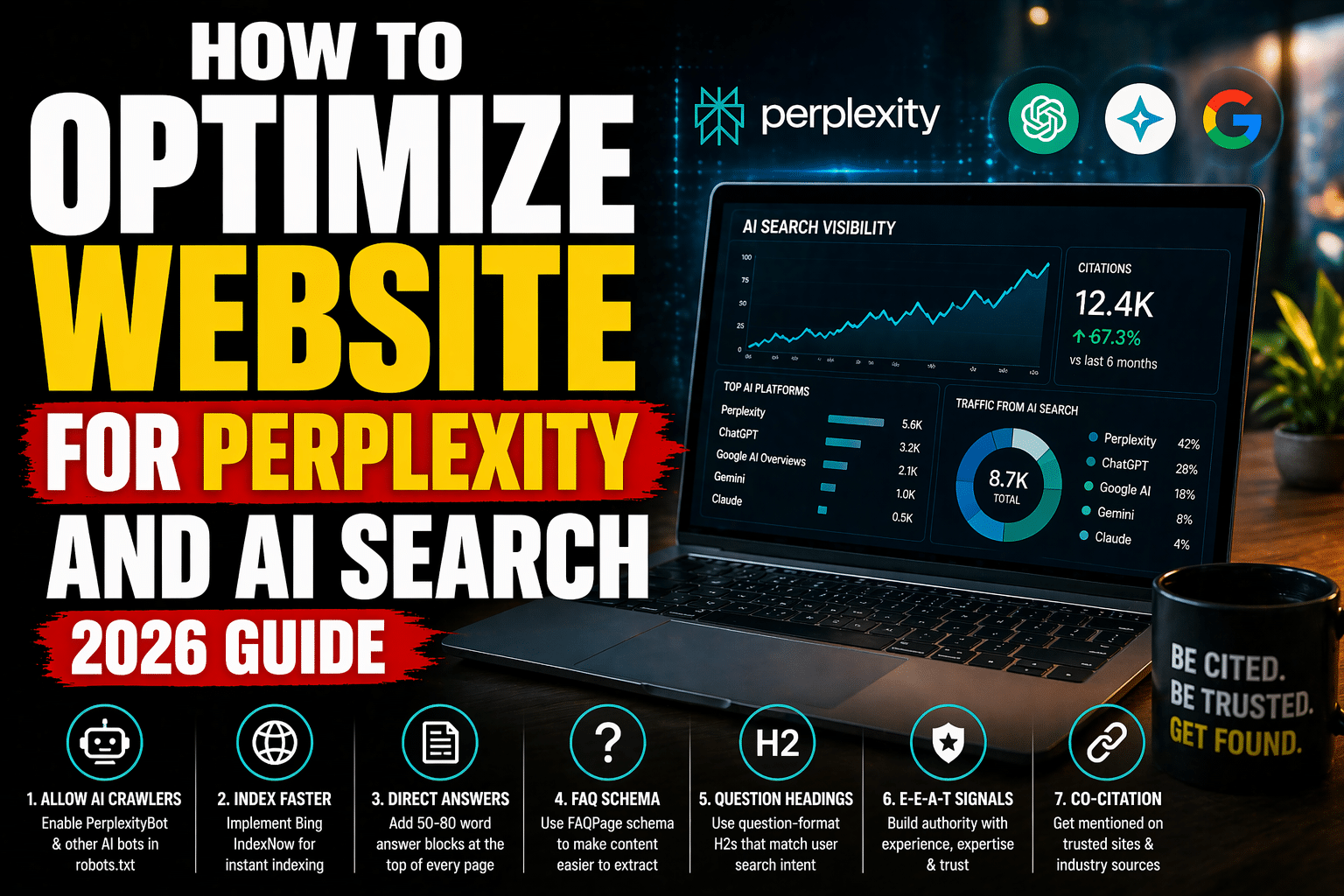
Step 1: Allow PerplexityBot in robots.txt. Add explicit allow rules for AI crawlers in your robots.txt file.
Step 2: Implement Bing IndexNow. Perplexity’s index is partially powered by Bing. Microsoft Bing’s IndexNow protocol allows you to submit new and updated URLs directly to Bing’s index immediately rather than waiting for passive crawling. This directly accelerates your appearance in Perplexity answers for fresh content.
Step 3: Write direct answer blocks. Place a 50-80 word standalone answer at the top of every page that directly addresses the primary question. Perplexity extracts these verbatim. Label them with a CSS class like .direct-answer-block for Speakable schema targeting.
Step 4: Implement FAQPage schema. FAQPage schema is the highest-impact structured data type for Perplexity citation. Each question-answer pair in your schema is a pre-structured extraction unit that Perplexity can pull directly. Include 4-6 Q&A pairs per page targeting related queries your audience asks.
Step 5: Use question-format H2 headings. Perplexity matches user queries against content headings. H2s formatted as complete questions (“What is X?” “How does Y work?” “Why does Z matter?”) match the natural language queries users type into Perplexity.
Step 6: Build E-E-A-T signals. Perplexity’s citation algorithm favors sources it can verify as authoritative. This means having an identifiable author, organizational credentials, and cross-source validation. When your content is cited on Reddit, referenced on Wikipedia, and covered by industry publications, Perplexity’s confidence in your site as a reliable source increases.
Step 7: Implement co-citation strategy. Co-citation means ensuring your brand appears alongside recognized authoritative sources on the same topics. Participate in industry forums, get coverage in trade publications, and build a presence on platforms that Perplexity already trusts.
3. robots.txt Configuration for All AI Crawlers
Add these directives to your robots.txt to enable full AI search visibility:
User-agent: PerplexityBot
Allow: /

User-agent: OAI-SearchBot
Allow: /

User-agent: ChatGPT-User
Allow: /

User-agent: Google-Extended
Allow: /

User-agent: ClaudeBot
Allow: /

User-agent: anthropic-ai
Allow: /
4. Direct Answer Block Structure
Every page optimized for Perplexity should open with a direct answer block formatted like this: a clear 50-80 word answer to the primary question, using the exact keyword phrase, presenting a specific and verifiable claim, and standing alone without requiring context from surrounding text. Perplexity’s extraction algorithm favors content that answers a question completely without requiring the reader to understand what came before.
5. FAQPage Schema Implementation
FAQPage schema with 4-6 question-answer pairs covering the primary query and related questions signals to Perplexity exactly which content units are answers. Include the primary keyword in the first question, address follow-up questions your audience asks, and keep each answer between 40-100 words.
6. Content Architecture for AI Extraction
Structure every page with: one direct answer block at the top, 6-10 H2 sections each addressing a specific sub-question, short paragraphs of 2-4 sentences, tables for comparisons, numbered lists for processes, and a FAQ section at the bottom. This architecture makes it trivial for Perplexity to extract the exact passage that answers each user query.
7. Tracking Perplexity Citations
Perplexity citations do not appear in Google Search Console. Track them through a weekly prompt audit: run 20-30 target queries in Perplexity, record which queries cite your site, note which pages are cited, track citation rate over time, and identify gaps where competitors are cited instead of you.
Article Summary
- Perplexity uses RAG architecture — it extracts and cites, it does not rank pages the way Google does
- PerplexityBot must be explicitly allowed in robots.txt — many sites block it inadvertently
- The 7-step Perplexity Visibility Stack: allow crawlers, IndexNow, direct answer blocks, FAQPage schema, question H2s, E-E-A-T, co-citation
- Bing IndexNow directly accelerates Perplexity visibility because Perplexity’s index is partially powered by Bing
- Direct answer blocks (50-80 words, standalone, specific) are the highest-impact on-page optimization for Perplexity citation
- FAQPage schema pre-structures content for LLM extraction — 4-6 Q&A pairs per page targeting related queries
- Track Perplexity citations through weekly prompt audits, not GSC
Frequently Asked Questions
How does Perplexity decide what to cite?
Perplexity uses RAG to retrieve pages via PerplexityBot, extract relevant passages, and synthesize answers. It favors content that is directly structured as answers (direct answer blocks, FAQPage schema, question-format headings), comes from sites with established E-E-A-T signals, and is indexed in Bing’s index.
Is Perplexity optimization different from Google SEO?
Yes. Google ranks pages based on authority and relevance. Perplexity extracts passages based on how well they answer a specific question. You need Google ranking as a prerequisite (Perplexity often starts with top-ranked pages), but you also need extraction-optimized content structure that traditional SEO does not require.
Does Perplexity use Google’s index?
Perplexity uses its own crawler (PerplexityBot) and also draws from Bing’s index. It does not use Google’s index directly. This is why Bing IndexNow is important for Perplexity visibility — getting into Bing’s index faster accelerates your Perplexity citation potential.
How do I check if PerplexityBot can crawl my site?
Check your robots.txt file at yourdomain.com/robots.txt. Look for Disallow rules that apply to all agents (*) or that specifically list PerplexityBot. Also check your CDN and security settings (Cloudflare, Sucuri) for bot blocking rules that might prevent PerplexityBot access independently of robots.txt.
Fuel Editorial Team
Fuel Online Strategist
Fuel Tech Lead
AI & Infrastructure Audit
Editorial Board
Data Integrity & Accuracy