
AI SEO – AEO Course 15
Apply AI SEO for SaaS to Supported Integration Workflows
AI SEO for SaaS integration pages starts with a verified supported workflow, not a list of partner logos. Explain what triggers the workflow, which systems exchange which objects, required permissions, eligible plans and failure handling. A buyer using ChatGPT or another search-enabled assistant needs enough evidence to distinguish a maintained supported integration from a connection that is merely technically possible.

Build integration pages around the commercial task. “Send invoice exceptions to a team channel” differs from “synchronize every billing object in both directions.” Both might sit beneath the same pair of product logos, but they imply different data, permissions, maintenance and price. A useful page names the task it actually supports before introducing broader possibilities.
Integration pages should keep the connection's status explicit. A native feature, a maintained third-party connector and a custom API project are different purchase propositions. State who builds, operates and supports the path. Do not describe a workflow as native because a customer could assemble it through another service, and do not imply partner certification without real approval.
Define success on integration pages from the buyer's perspective. An alert arriving with an invoice identifier and a useful next action may complete one workflow. A reliable two-way accounting sync needs a different set of acceptance tests. The page should help the buyer decide whether the integration meets their requirement before they spend time on installation or a sales call.
Treat discoverability and factual suitability as separate outcomes. An assistant can cite an integration page while overstating what it does. Improve the page's evidence and explanation, then test the claims the assistant makes. Clear documentation is useful commercial content; it is not a guarantee that an AI search system will select or recommend the product.
AI SEO for SaaS should preserve the difference between a supported integration and a product pairing that could be built. SaaS integration pages for AI search answer a concrete buying task: which route handles the required objects, permissions and operating responsibilities? AEO for SaaS integrations uses that verified scope to make commercial explanations checkable; it should not turn an API possibility into an available feature.
Build Capability Evidence for SaaS Integration Pages in AI Search
Create a capability contract for the workflows described on integration pages. Include the supported trigger, direction, source object, destination object, required fields, identity rules, authentication, prerequisites and plan eligibility. Record version boundaries and the accountable product owner. This record should be concrete enough that a marketer can write accurately and an engineer can identify an unsupported promise.
Name the supported direction and authoritative system
Define direction precisely. One-way alerts do not imply one-way data synchronization, and one-way synchronization does not imply two-way conflict resolution. “Connects with” leaves all three interpretations open. Replace it with a statement of what moves, when it moves and which system remains authoritative for the resulting data.
Expose object and field coverage limits
Describe object coverage. An integration that supports invoices may not support credit notes, subscriptions or custom objects. A contact sync may exclude archived contacts, ownership changes or selected fields. State the meaningful limits instead of hiding them in installation notes. A narrow supported workflow can still be valuable when buyers know its boundary.
Document the identity join. Which account, workspace, customer or invoice identifier connects the records? What happens when an identity is missing, duplicated or associated with the wrong tenant? A visible explanation can stay readable while still showing that these cases have an owner. Do not expose sensitive identifiers or credentials in public examples.
Separate expected timing from a contractual commitment. A workflow may usually react promptly while still allowing asynchronous delivery, processing queues or downstream delays. Publish only verified service commitments. If exact timing is not guaranteed, explain what users can observe and how they can recognize a failed or delayed action.
Integration pages must explain commercial dependencies. A connector might require a paid plan on either system, administrative permission or a separate subscription. Include those prerequisites near the primary action. A technically compatible workflow that the buyer cannot authorize or afford is not a complete solution to the commercial task.
Compare Native, Connector and API Paths for AEO
Compare native, connector and custom API paths using the same task. A native integration usually provides one product's supported experience with an identifiable owner. Its advantages depend on the actual feature set and maintenance commitment; the label alone does not prove broader coverage, reliability or lower cost. Ask which workflow the product team actually supports.
A maintained automation connector can suit a task that fits its available triggers and actions. Evaluate field access, execution limits, account permissions and error handling. Some requirements may depend on the connector platform's plan. Make the support boundary visible so a buyer knows whether a failure belongs to your product, the connector or the destination system.
Separate custom possibility from a shipped integration
A custom API integration can support specialized needs when the APIs and authorization permit them. It requires development, testing, operation and maintenance. A page can explain that route without presenting a future project as an available feature. “Can be implemented through the API” should identify what still needs to be built and who is responsible.
Compare total responsibility alongside cost. A low connector subscription can become expensive if the workflow requires manual exception handling. A custom implementation can be appropriate for a critical process when the organization can maintain it. Avoid invented market prices; use the buyer's actual staffing, execution volume and support obligations as inputs.
Choose a recommendation rule based on the task. Prefer the simplest supported path that meets required object coverage, security, commercial and operational constraints. If no path meets a mandatory requirement, state that clearly. Do not manufacture a winner because the page is supposed to generate leads.
A useful comparison table should expose the next validation question. For a native integration, ask what is actually supported. For a connector, ask which trigger/action and plan limits apply. For custom work, ask whether the required API operations and operating ownership exist. Those questions are more actionable than a row of generic advantages.
| Path | Useful fit | Important limit | Owner to verify |
|---|---|---|---|
| Native | A maintained product feature meets the required task. | Coverage may be narrower than the partner API. | Your product team. |
| Connector | Available triggers and actions fit the workflow. | Platform plans, execution limits and support boundaries apply. | Connector operator and product owners. |
| Custom API | A specialized task justifies development and maintenance. | Technical possibility is not a shipped feature. | The team building and operating the project. |
Worked SaaS AEO Example: Alert Direction and Permissions
Consider an illustrative billing application that sends invoice exception alerts to a Slack channel. The fictional workflow begins when a supported billing event indicates an invoice requires attention. It sends a selected invoice identifier, exception category and a safe link to the authorized internal destination. This is an instructional design, not an implemented Fuel application or a certified partner integration.
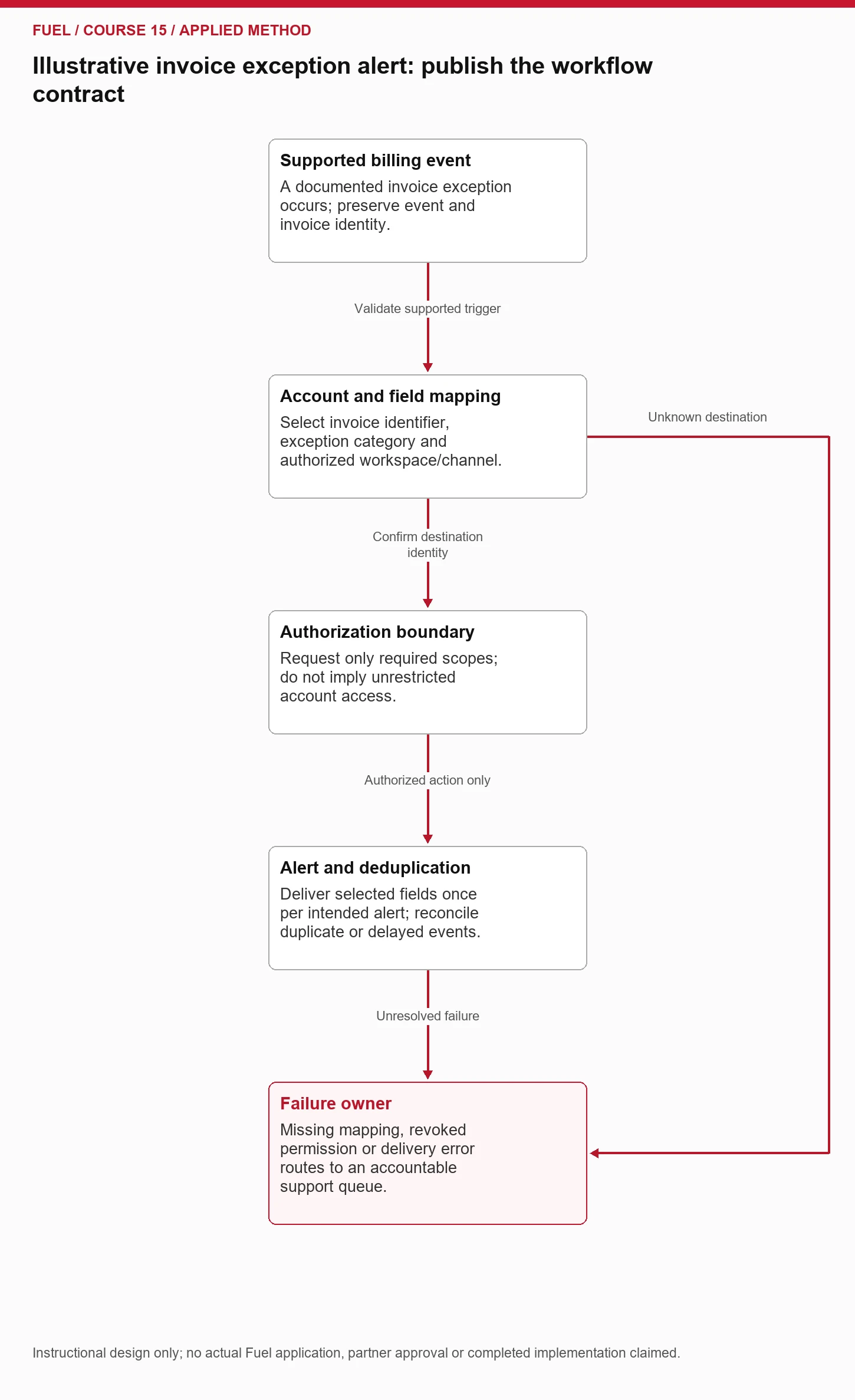
First define the trigger. “Invoice exception” needs an actual supported event or a documented transformation of source events. A payment delay, failed collection and disputed charge may require different actions. The page should not combine them into one promise unless the product genuinely handles each case. Name the supported cases and the ones that remain outside scope.
Next map the destination. The billing account must connect to the intended Slack workspace and channel. Record how an administrator selects that destination and how a change is authorized. A shared company name is not a reliable tenant identifier. A mapping error can send useful information to the wrong place, so its failure behavior deserves explicit design.
Slack's OAuth documentation explains that requested scopes govern the app's authorized access. [1] Describe the permissions the real workflow needs and why. Avoid requesting or implying unrelated access merely to make the integration sound more powerful. Installation approval and ongoing authorization belong to the operating workflow, not just the setup screenshot.
Keep the alert payload focused on the task. An invoice identifier and exception category may be enough to route attention, while sensitive customer details belong behind the appropriate access controls. Use fabricated identifiers in examples and explain what a recipient can do next. Do not make a channel message a substitute for authorized billing access.
Finally define successful completion. The right authorized channel receives the intended alert, duplicates are handled under the stated rule, and unresolved failures reach an accountable queue. A successful API response at one step may not prove the recipient received a usable message. Choose acceptance evidence that reflects the actual buyer task.
Document identity mapping, retries and duplicates
Design a failure matrix before writing reliability claims. Include a missing destination mapping, revoked authorization, unsupported object, malformed field, duplicate event, delayed event and downstream outage. For each case, state the observable symptom, safe immediate action, retry boundary and responsible owner. Publish the limitations buyers need while retaining sensitive implementation details privately.
Stripe documents webhook notifications for asynchronous events. [2] That supports describing an event-driven path, not promising unique, ordered or immediate delivery. A real implementation needs its own tested handling rules. Do not copy a provider's broad capability into an end-to-end reliability claim about a workflow that has never been built or evaluated.
Deduplicate the business action, not every object update
Define duplicate handling at the business-action level. Two deliveries of one event should not automatically produce two independent escalations if the intended outcome is one alert. An update to the same invoice may, however, be a legitimate new event. Preserve event identity and the relevant invoice state rather than deduplicating every repeated invoice identifier indiscriminately.
Explain delayed or out-of-sequence events in terms of the user task. If an invoice has already been resolved, a late exception alert may mislead the team. Decide whether the handler checks current state, labels the event time or routes a review. The appropriate response depends on the supported workflow; do not claim a universal algorithm solves every integration.
Distinguish retry from reconciliation. Retrying a failed delivery can recover a transient problem. Reconciliation compares the source and destination or action log to find missing work. A system can accept every retry while still missing an event that never reached the handler. The page's operational explanation should acknowledge whichever recovery mechanisms actually exist.
Give readers of integration pages a usable support path. Tell them how to identify the affected workflow and what safe diagnostic information to provide. Do not ask them to paste secrets or sensitive customer payloads into public channels. A clear ownership boundary can be more useful to a buyer than an unsupported promise of seamless connectivity.
Keep Integration Pages Aligned With Implementation Evidence
Keep the commercial page and implementation evidence aligned. The commercial page should answer whether the workflow fits, what it costs or requires, and where its limits lie. Implementation documentation should explain setup, authorization, supported fields and troubleshooting. Different audiences need different levels of detail, but the underlying capability must be the same.
Create a claim-to-evidence record. For each material promise, point to a supported capability, acceptance test or accountable product decision. “Sends invoice exception alerts to a selected channel” should have evidence for that specific path. “Keeps your finance and collaboration systems synchronized” implies much broader behavior and should not survive review if only alerts are supported.
Use screenshots and examples responsibly. Show the actual supported state when real product evidence exists. Otherwise, label an illustrative workflow as illustrative. A mockup should not imply a completed installation, partner approval or tested customer result. Keep the visual's facts aligned with the prose and version it when the workflow changes.
Put plan and authorization prerequisites near the action
Write prerequisites near the decision point on integration pages. If an administrator must approve an app, the buyer should learn that before clicking an installation button. If only a particular plan supports the required object, put the plan condition beside the capability. A buried limitation may be technically documented while still producing an inaccurate commercial impression.
Prepare a release checklist for capability changes. When a new field, permission or plan boundary changes, update the commercial page, setup guide, comparison table, screenshots and relevant support answers. Use the content freshness and change-control workflow to track the dependencies rather than trusting a page editor to remember every reference.
Ask sales and support what questions recur, then verify those answers with product ownership. Their observations can reveal gaps, but a common request does not establish that the product supports it. Preserve the distinction between available, planned, custom and unsupported features throughout the content.
Choose Integration Content That Earns a Distinct AI Search Destination
Give an integration its own indexable destination when it serves a distinct evaluation task with enough supported detail. A useful page may describe a common workflow, relevant prerequisites, object coverage, limitations, setup path and commercial fit. A logo and several generic paragraphs do not supply the same value.
Map intent by workflow rather than generating every imaginable product pairing. “Billing exception alerts in Slack” and “two-way finance synchronization” may need different destinations if both are real, substantial supported offerings. Several near-identical pages for spelling variants or partner categories can confuse ownership without helping a buyer choose.
Connect the integration page to relevant product capabilities and buying questions. A user evaluating alert routing may need the product's exception-management explanation, plan eligibility and a setup guide. Use those connections to complete the task. Avoid an indiscriminate partner directory that sends every visitor through the same generic sales pitch.
Keep naming precise. State whether a partner provides the connector, your company maintains it or the customer must build the API path. Do not use “official,” “certified” or a partner badge without genuine authorization. A recognizable logo cannot replace a factual description of the relationship.
Explain alternatives where they are useful. A buyer whose requirement exceeds the native path may fit a documented connector or a scoped custom project. Another buyer may be better served by a different workflow entirely. Publishing an accurate disqualification condition can improve the quality of the inquiry even when it reduces raw form fills.
When AI search answers cite the page, inspect the capability they repeat. The meaningful question is whether the recommendation matches a supported task and commercial context. A citation count does not show that the buyer was given the right integration path.
Validate ChatGPT Integration Recommendations Against Product Evidence
Assign a product or engineering owner to verify integration claims, and a content owner to keep the public explanation current. Define update triggers: API deprecation, scope changes, plan changes, connector limits, marketplace status, supported object changes and significant incidents. Each trigger should identify the dependent assets and a verification step.
Test the primary action offered on integration pages. Follow installation or documentation links using safe authorized test conditions, and check whether the selected integration identity survives the journey. A useful explanation followed by a broken setup destination is still a failed buyer experience. Record access-dependent checks honestly if the required account or environment is unavailable.
Include a buyer requirement the integration cannot satisfy
Build AI search questions around constraints. Ask which route fits a required object, whether the workflow is one-way, which plan is needed and what happens after authorization is revoked. Include a question that the integration cannot satisfy. A trustworthy answer should preserve the limitation rather than recommending the product for every scenario.
Record observed answers with their conditions and supporting URLs. Separate factual accuracy from mention and citation. If an answer claims two-way synchronization where the page supports alerts only, inspect the source wording and other controlled references before assuming the assistant invented the claim without influence. Preserve the actual evidence.
Use the pricing-page total-cost method to explain connector charges, plan prerequisites and custom-work boundaries. Connect actual qualified visits through AI search referral attribution where evidence exists, while keeping pipeline association separate from causal revenue.
Close the review with a capability contract, accurate public page, working next action and explicit unknowns. Future engine selection remains an observation. The asset should be useful to a buyer who never encounters it through an assistant, while remaining precise enough to check when an assistant does describe it.
When buying integration content optimization for AI search, supply product-approved capability records and ask the agency for a claim-to-evidence map, accurate page, usable setup path and a task-based observation panel. ChatGPT integration recommendations should be scored for direction, object coverage and prerequisites as well as citation presence. Keep engineering acceptance, editorial delivery and later assistant behavior distinct so a polished page cannot conceal an unsupported workflow.
Exercise: reject a technically possible but unsupported claim
Evaluate this fictional request: “Keep all invoice edits synchronized both ways between our billing tool and Slack, including changes made in chat.” The supported workflow only posts invoice exception alerts to a selected channel. An API may make additional work conceivable, but no maintained two-way editing feature exists.
Reject the broad promise. Explain that the available integration sends selected alerts in one direction and that billing edits remain in the authorized billing system. If a separate custom route is genuinely available, scope its required operations, authorization, conflict handling and support obligations before presenting it as an option. Do not turn an engineering possibility into a current product feature.
Rewrite the page's answer: “The supported workflow posts invoice exception alerts to your selected Slack channel. It does not synchronize invoice edits or accept billing changes from chat. Administrators authorize the connection and choose its destination. Review plan eligibility and setup requirements before installation.” The exercise's wording is illustrative, not a description of an actual application.
Check the repair against four criteria: direction is explicit, supported objects and action are named, the unsupported requirement is clear, and the next step resolves a real prerequisite. Add a failure owner and update trigger to the private capability record. The result is a commercially useful answer with a testable boundary.
Sources and evidence notes
[1] Slack, Installing via OAuth authorization code flow. Accessed October 25, 2026. [2] Stripe, Receive Stripe events in your webhook endpoint. Accessed October 25, 2026.
Apply the workflow
Ask Fuel Online to evaluate the reader's evidence, content and measurement system using the defined task.
Explore the AI SEO and AEO course curriculum.
Discuss AI SEO and AEO implementation with Fuel Online.