

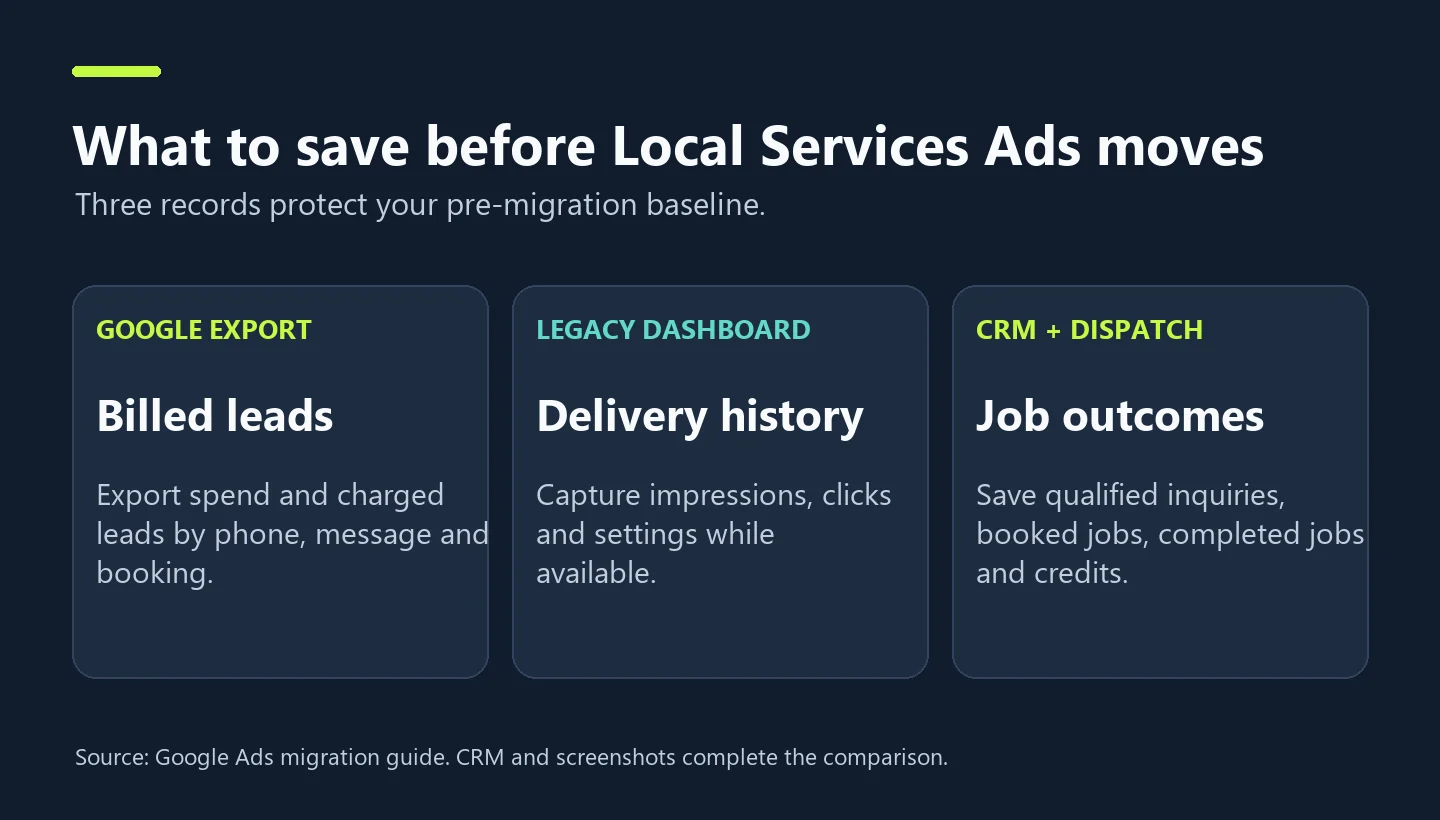
Use this Local Services Ads migration checklist to protect the campaign history you need before Google moves your account to a specialized Performance Max campaign with pay-per-lead goals. Before your account moves, download the lead history, capture any additional metrics you can still see, and save a CRM baseline that connects ad spend to qualified inquiries and booked jobs. Google says historical performance reports do not migrate into Google Ads. The historical download covers total lead spend and charged leads by phone, message, and booking. Clicks and impressions are outside the export. Google Ads migration guide
For a plumber, roofer, pest control company, or HVAC operator, the immediate risk is simple. The ads can keep generating calls while your ability to compare this month with last month disappears. Save two kinds of evidence. Keep Google’s billing and delivery records, then preserve your own evidence of who answered, which inquiries qualified, and which turned into a job.
What changes when Local Services Ads move to Performance Max?
The migrated campaign still charges for eligible leads and serves in the same local placements on Google Search and Maps. It is a specialized campaign type. Google’s migration documentation distinguishes it from standard Performance Max, which can serve across a broader mix of Google inventory. Your ads can still generate calls, messages, and bookings where those options are supported. Google Ads becomes the place to manage and respond to those leads. Google Ads migration guide
The rollout began with select U.S. service advertisers in August 2026. Google lists broader groups for late 2026, with remaining categories and non-U.S. accounts scheduled for 2027. Expect an administrator notice roughly 14 days before your account’s migration and a reminder a week later. Use the date in your own notification to plan coverage. If you oversee multiple branches, each account can need a separate handoff, even when one agency manages them all. Google Ads migration timeline
| Evidence | Source | Save this |
|---|---|---|
| Google lead history | Historical LSA report | Spend and charged leads split by type |
| Legacy dashboard | Reports and settings while accessible | Impressions, clicks, historical settings, visible filters and time ranges |
| Lead outcomes | CRM, call tracking and dispatch | Unique inquiries, qualified leads, bookings, completed jobs and credits |
Local Services Ads migration checklist: What should you download?
1. Export account history and document what is missing
Download the largest useful historical range you can access. Retain the raw export untouched and make a separate analysis copy. If your dashboard exposes finer date ranges, save monthly or weekly exports where practical so you can isolate seasonality and build a recent baseline. Keep each file with its customer ID, branch, currency, date range, and export date. If you have already migrated, Google provides a historical download from the old dashboard’s redirection page. Retrieve it while you have account access. Google Ads historical reports
Save dated screenshots or permitted exports of impression and click data still visible in the legacy interface. Capture the date selector, location filter, and metric labels in the same screenshot. Write down the budget, bid mode, service area, job types, hours, booking configuration, and the phone or message route each location uses. For a multilocation business, make one row per location. Someone should be able to identify the branch at the other end of every contact route without calling an employee who remembers how the account was set up.
2. Export the CRM data that Google cannot reconstruct
At minimum, export inquiry date and time, lead ID, source, branch, service requested, ZIP code or operating market, disposition, booking status, appointment or job ID, and booked date. If your business reports completed revenue, add completion date, realized revenue and a consistently defined contribution margin where available. Use an access-controlled file for customer data. An aggregate reporting spreadsheet only needs counts and totals.
Decide which inquiry qualifies with the person who runs dispatch. An emergency plumbing lead might qualify when the caller has an active problem the company repairs, is inside the dispatch area, and can provide a serviceable address. A commercial roofing lead might require a commercial property and a request for an eligible assessment. A price shopper can still be qualified. A request involving a service you never offer is outside scope even if the caller stayed on the phone for six minutes. Train dispatchers on a short set of reason codes that can actually be used during a busy shift.
3. Reconcile the handoff from Google’s lead inbox to the job board
For each Google lead record, use a shared platform or integration ID when available. When you need a fallback, match location, contact reference, and a narrow time window and mark uncertain matches for review. Keep a single CRM inquiry when someone sends a message and then calls about the same job. Preserve the original Google charged lead total as a platform count. A unique CRM inquiry can map to multiple platform interactions.
Use status buckets such as matched, unmatched, duplicate inquiry, credited, and pending review. If 140 charged leads become 115 traceable CRM inquiries, report the gap explicitly. The missing 25 could include repeat contacts, missed transfers, or inconsistent tagging. Review a sample of unmatched leads before making any claims about quality. If a branch is small enough, review all of them.
How to compare cost per charged lead, qualified lead, and booked job
Use the same spend definition before and after, preferably net media spend after posted credits for each cohort. Record gross spend and credits separately if you need to reconcile invoices. Assign a qualified lead or a booking to the date of the original inquiry. Otherwise an installation booked in December from a November call will improve the wrong month’s result. Compare cohorts with the same time to mature, such as 14 days for both if most of your jobs book within 14 days. Long sales cycles may need more.
| Metric | Calculation | Before | After |
|---|---|---|---|
| Net media spend | Gross spend less credits | $5,400 | $5,100 |
| Charged leads | Google reported count | 120 | 125 |
| Qualified inquiries | Unique eligible CRM inquiries | 72 | 63 |
| Booked jobs | Unique jobs from those inquiries | 42 | 34 |
| Cost per charged lead | Spend / charged leads | $45.00 | $40.80 |
| Cost per qualified lead | Spend / qualified inquiries | $75.00 | $80.95 |
| Cost per booked job | Spend / booked jobs | $128.57 | $150.00 |
In this illustrative example, the cost per charged lead improved by 9.3%, while the cost per booked job rose by 16.7%. Qualification per charged lead fell from 60.0% to 50.4%. Booking per qualified inquiry fell from 58.3% to 54.0%. That tells the operations team where to look next. Check which ZIP codes, service categories, and contact types account for the qualification drop. Then review callback delays and appointment availability to explain why fewer qualified leads booked.
Download the Local Services Ads migration spreadsheet (.xlsx). Use the editable comparison tab or follow the worked example.
Multi-branch operators should calculate the rollup from the underlying spend and job counts. If Boston spends $3,000 for 30 jobs and a smaller market spends $1,200 for six, the combined cost is $4,200 divided by 36, or $116.67. An unweighted average of the two branch rates gives $150 and overstates the cost of the portfolio. A location with missing outcomes still belongs in the data quality report. Flag the missing numbers before pooling it with complete branches.
What to check on migration day
Assign a named campaign owner and a named dispatch owner. In Google Ads, confirm the correct location and campaign, daily budget, bidding strategy, service types, operating areas, schedule, and enabled lead routes. Check call and message forwarding against the configuration you saved and verify who can see the new lead inbox. Ask the front desk and after-hours service to confirm their routes through internal tests. Review legitimate incoming leads in the inbox and CRM as they arrive. Avoid clicking your own live ads or generating billable dummy leads.
Google calculates the average daily budget from the prior average weekly budget by dividing by seven. For example, $700 weekly converts to $100 daily, with a monthly charging limit typically based on 30.4 times the daily budget. If you manage budget across territories, verify the summed daily budgets. Manual bids and category-specific target CPA inside a single campaign are deprecated in the migration. If Google consolidates your category targets, save the previous targets and determine whether separating campaigns is justified by spend, lead volume, and economics. Google Ads bidding and budget adjustments
Confirm the business name, address, and hours against Google Business Profile. Google says core business information syncs from the profile into Ads. Treat routing and listing changes as distinct jobs. A dispatcher who needs to route calls to an evening queue can check the Ads settings while the profile owner handles public business hours. Significant changes to core identity can prompt verification review, so schedule these with the branch owner. Google Ads migration guide
What to do during the first two weeks
Google says performance can take up to two weeks to stabilize. Treat a confirmed routing or budget problem as an immediate operational issue. For trend judgments, record the transition separately from the steady-state comparison. Watch incoming volume, answered calls, message response, charge status, and CRM match rate each business day. Keep the same lead qualification rules and resist bundling major service area, schedule, and bid changes into the same week. When you fix an issue, date the change so you can account for it in the review. Google Ads migration guide
After the ramp period, compare equal windows with comparable weekdays. A useful starting point is 28 days on each side, excluding the transition and allowing the same time for booking. Compare the same season a year ago when demand is highly seasonal. Record unusual drivers such as storms, heat waves, competitor closures, call-center staffing changes, or a big promotion. If Saturday callbacks grew from 15 minutes to three hours, a spike in cost per booked job deserves a dispatch investigation before a bidding overhaul.
If you need a profit threshold, calculate it from contribution margin and the fraction of bookings that become completed jobs. For example, if an average completed job returns $360 before acquisition and 75% of booked jobs complete, expected contribution before acquisition is $270 per booking. At $150 per booked job, that leaves $120 before any costs you excluded from your calculation. Use actual service-level margins where possible, since the economics of an emergency repair and a maintenance visit can look entirely different.
Diagnose a lead drop before you adjust the budget
Read the campaign from left to right. A spend drop and fewer charged inquiries point to the advertising setup or a demand change. Flat spending and fewer qualified leads point to the mix of inquiries. Flat qualified volume with fewer bookings points toward operational capacity, call handling, or the offer. Compare each condition by branch and service type before you treat it as a portfolio problem.
For example, a pest control company might see phone volume hold while message leads fall by half. If the company recently changed its message forwarding number, verify the destination and account permissions. If the messages reach the inbox but sit untouched until the next day, give the operations team its own response target and review it alongside ad spend. Neither problem requires expanding the service area to manufacture more volume.
Preserve enough baseline notes to make these diagnoses later. A spreadsheet with recent spend and lead totals gives management the rate calculations. A short migration log holds who changed what, when it happened, and whether call or message delivery was independently verified. On a branch call, those two records are more informative together than the campaign overview alone.
Save a note on the oldest period you can still recover and the latest day covered. That date matters when someone later tries to compare calendar months that appear complete in different systems.
Local Services Ads migration FAQs
Do I need to create a new Performance Max campaign?
Google describes migration of eligible existing accounts as automatic. Verify the campaign listed in your own notice and check the transferred settings before creating anything new.
Can I recover historical impressions after I move?
Google’s historical download excludes clicks and impressions. If your team had exported those reports or recorded them in an independent dashboard, use that archive. For missing history, mark it unavailable and start tracking from the first reliable post-migration date.
Which number should a home services owner review first?
Start with cost per booked job, then look at qualified lead volume, booking conversion, and completed job margin. Google’s charged lead number provides the upstream check for billing and delivery.
Can I compare LSA leads with regular Google Ads website leads?
You can compare acquisition economics if each channel uses the same CRM qualification and booking rules, deduplicates across calls and forms, and gives each cohort the same time to mature. Keep the platform’s original event counts visible so you can reconcile reporting.
For teams that manage both paid acquisition and Maps visibility, review how the two programs reach local customers alongside dispatch and booking capacity. Fuel Online local SEO services